Built for M3U & M3U8
A media player designed around standard playlists — paste an M3U or M3U8 link and BOB Player organises it into live TV, films and series.
Enjoy your favourite shows and movies with BOB Player. It plays your playlists for a seamless viewing experience — add an M3U or M3U8 link, and your live TV, films and series are organised and ready to watch.
BOB Player is a premium M3U and M3U8 media player. You supply the playlist; BOB Player turns it into a smooth, organised viewing experience with a programme guide, favourites and separate sections for live TV and on-demand.
Because it is a player, BOB Player does not include any channels of its own. That keeps it flexible: load any standard IPTV playlist, refresh it whenever you like, and even keep several playlists side by side.
Player vs subscription. BOB Player is the app that plays a playlist. A subscription is the playlist of channels itself. They are related but separate — and BOB Player is not the same as the BOB IPTV UK subscription.
A media player designed around standard playlists — paste an M3U or M3U8 link and BOB Player organises it into live TV, films and series.
Enjoy your favourite shows and movies with smooth, responsive playback and quick channel switching.
A clear programme guide and favourites list, so what you watch most is always easy to find.
Save more than one playlist and switch between them, handy if you keep separate lists for sport, films or the family.
Plays HD and Full HD streams cleanly where your playlist and connection allow.
Runs alongside the major VPN apps without fuss for viewers who prefer one.
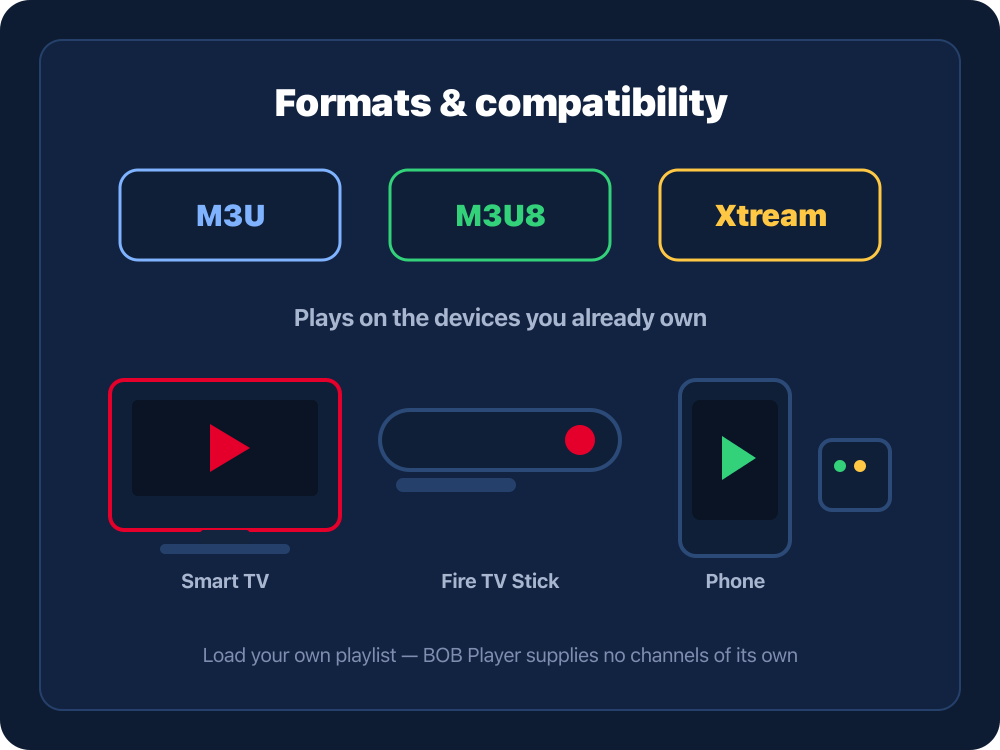
BOB Player supports the standard IPTV playlist formats and installs on the devices you already use.
Not sure of the difference? M3U8 is the UTF-8 version of M3U and handles channel names and special characters better.
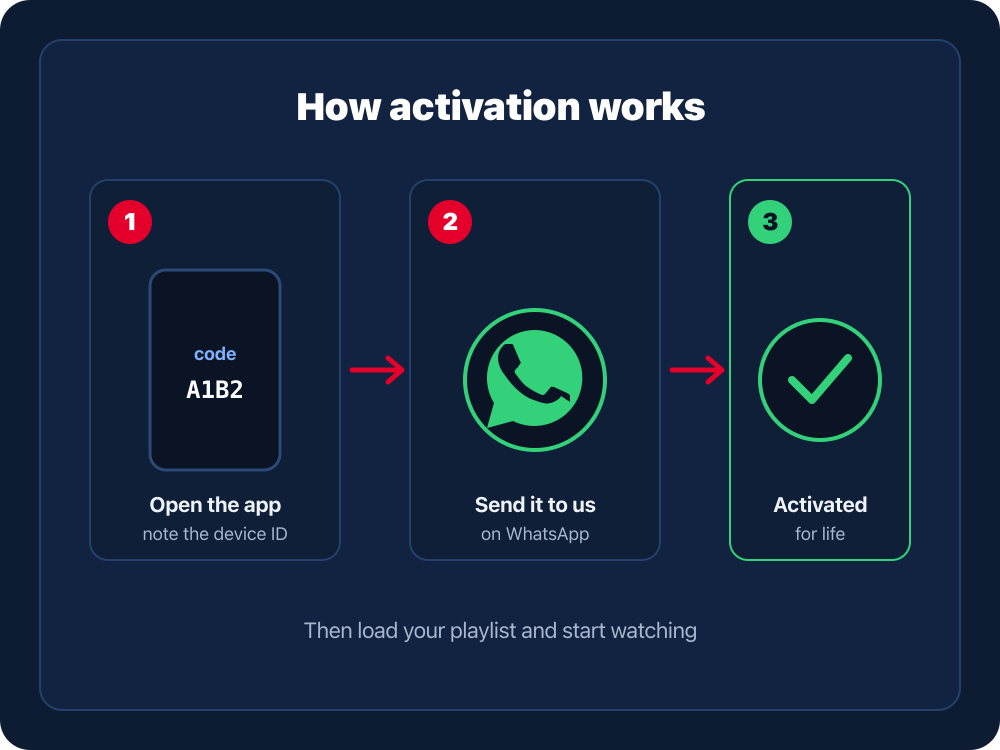
Install BOB Player on your device and open it. The screen shows a device ID or activation code used to unlock the player.
Message our team on WhatsApp with the device ID or code shown. That is all we need to register and unlock BOB Player on your device.
We register your device so BOB Player is unlocked. Reopen the app if it does not refresh straight away.
Enter your M3U/M3U8 URL or Xtream login. BOB Player loads your channels and guide, and you can reload or swap playlists any time.
BOB Player keeps your playlists under your control. Everything happens inside the app with a standard playlist link — there is no special account or extra login to learn.
Where the playlist comes from: BOB Player plays a playlist you provide. A BOB IPTV UK subscription supplies a compatible M3U or Xtream login through our secure checkout, and our team can send it to you and help you load it via WhatsApp support. We only offer playlist help the service genuinely provides — there is no separate playlist app or account to sign up for.
BOB Player is the player; your subscription is the playlist. Put them together and you have a complete IPTV setup.
BOB Player, unlocked on your device, handling the interface, guide and playback.
Your M3U/M3U8 or Xtream login from an IPTV subscription — the actual channels and VOD.
Add the playlist once and BOB Player plays your shows and films for a smooth experience.
Need a compatible playlist? Get a BOB IPTV UK subscription, or read the IPTV setup guide first.
Message us on WhatsApp to set up BOB Player, and grab a compatible IPTV subscription so you have a playlist ready to load.
Reopen the app so it re-reads its licence. If it still asks to activate, send us the device ID on screen and we will register it.
Almost always the URL was typed slightly wrong or the subscription behind it has lapsed. Re-enter the link exactly, confirm the subscription is active, then reload.
Use the M3U8 (UTF-8) version of your playlist where offered — it handles special characters and channel names more reliably than plain M3U.
Guide data is provided by your playlist, not the player. Allow a little time for it to load and make sure your subscription includes EPG.
BOB Player is a premium M3U and M3U8 media player. You add your own playlist and it plays your live channels, films and series for a smooth, organised viewing experience. It is a player app — it does not include any content of its own.
Both are playlist formats that tell the player where your streams are. M3U is the classic playlist file, while M3U8 is the same idea encoded in UTF-8, which handles channel names and special characters more reliably. BOB Player supports both.
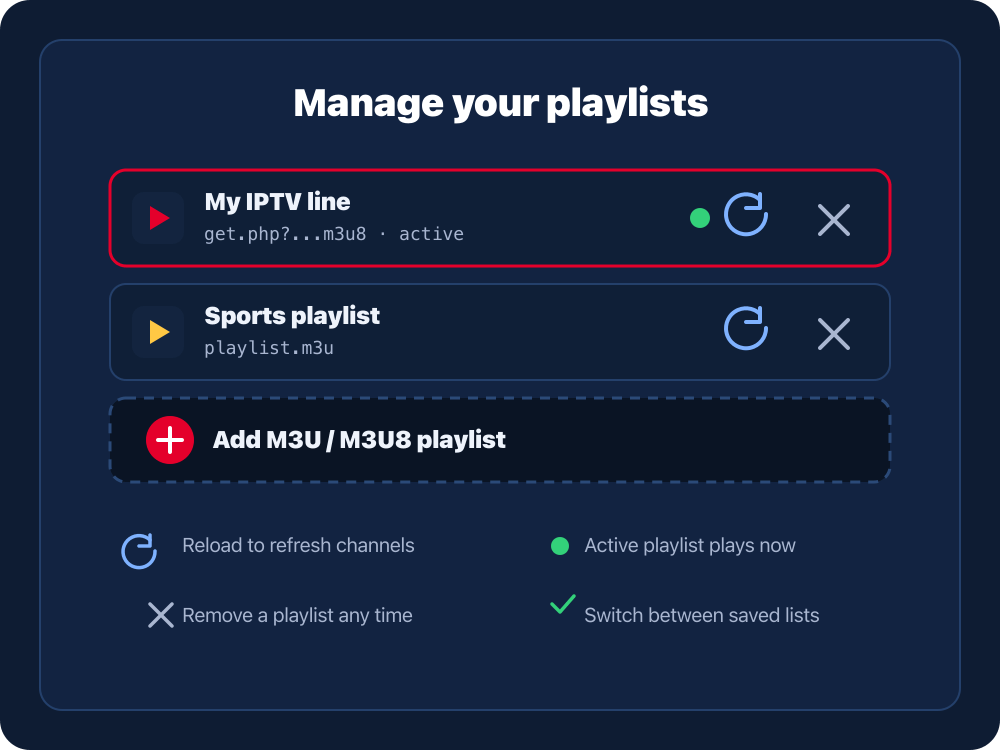
In BOB Player you add a playlist by entering its M3U or M3U8 URL, or an Xtream Codes login. From the playlist screen you can reload it to pull the latest channels, remove it, or add another playlist and switch between them.
Open BOB Player and note the device ID or activation code shown. Send it to us on WhatsApp and we register the device so the player is unlocked. Activation covers the app; your playlist is added separately.
BOB Player runs on Amazon Fire TV Stick and Fire TV, Android phones, tablets and TV boxes, and Android-based Smart TVs. Any device that can install the player and reach your playlist URL will work.
No. BOB Player is only the media player. To watch, you load a playlist such as a BOB IPTV UK subscription, which supplies the M3U or M3U8 link and the actual channels and on-demand library.
Yes. Because the playlist is separate from the app, you can reload it any time to refresh the channel list, or replace it with a new M3U or M3U8 link without reinstalling or re-activating BOB Player.
Usually the playlist URL was typed slightly wrong, the subscription behind it has expired, or the connection dropped. Re-enter the link exactly as supplied, check your subscription is active, and try reloading. If it persists, message us on WhatsApp.
They are related but separate. BOB Player is the M3U and M3U8 media player you install and activate on your device. BOB IPTV UK is the subscription that gives you a compatible playlist to load into it.
BOB Player is a third-party media player and any related trademarks belong to their respective owners. It is a separate product from the BOB IPTV UK subscription. BOB IPTV UK provides setup help and compatible IPTV subscriptions; it is not the developer of the BOB Player app.
A premium M3U and M3U8 media player for seamless live TV, films and series. Get set up today.